Asterik based system are mainly used for Voice Call over IP. With some modification, it can be also use for Video calling.
In the guide I pasted above, they say to add the following to sip.conf:
In Red Hat Based System, you will find sip.com at /etc/asterik/sip.conf
[general]
videosupport=yes ; enable Asterisk video support
[101]
type=friend
username=101
secret=hidden
host=dynamic
context=internal
callerid=Video Phone <101>
disallow=all ; better for custom-tunning codec selection
allow=ulaw
allow=alaw
allow=gsm
allow=h263 ; H.263 is our video codec
allow=h263p ; H.263p is the enhanced video codec
dtmfmode=rfc2833 ; inband is not supported in compressed codecs like gsm, so we better set it to rfc2833
canreinvite=no ; canreinvite must be set to 'no'
However, with TrixBox you actually just add
[general]
videosupport=yes ; enable Asterisk video support
to sip.conf and the rest,
[101]
type=friend
username=101
secret=hidden
host=dynamic
context=internal
callerid=Video Phone <101>
disallow=all ; better for custom-tunning codec selection
allow=ulaw
allow=alaw
allow=gsm
allow=h263 ; H.263 is our video codec
allow=h263p ; H.263p is the enhanced video codec
dtmfmode=rfc2833 ; inband is not supported in compressed codecs like gsm, so we better set it to rfc2833
canreinvite=no ; canreinvite must be set to 'no'
Wednesday, August 11, 2010

Unlock hidden Windows 7 Themes

There are a number of regional themes with multiple unique background images hidden from Windows 7 users. On a Windows 7 install with United States regional settings only the United States theme is shown but there are actually four more themes hidden from view.
All these hidden themes can be accessed once you know where to find them. The trick is to navigate to the C:\Windows\Globalization\MCT directory.
The MCT directory within the Globalization directory is super hidden so it will not display even if show hidden files and folders is enabled.
Just click on the address bar of any folder and manually type in or copy and paste in C:\Windows\Globalization\MCT and hit Enter.
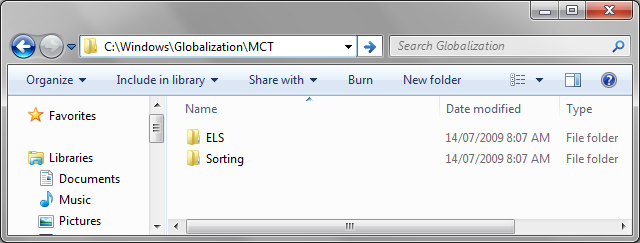
Once you have reached the MCT folder you will see five directories as listed below:
- MCT-AU
- MCT-CA
- MCT-GB
- MCT-US
- MCT-ZA
To view and use the theme for each region just navigate into each MCT-Region directory, enter the Theme folder and double click the theme file.
Thursday, June 10, 2010
Fedora 13 Released
Fedora 13 Released
The Linux distribution Fedora version 13 is now available for download.
Highlights of this release include:
- Automatic installation of printer drivers using PackageKit
- Automatic installation of language packages matching the user's language
- The GUI enabled application for user account administration has been rewritten
- Color management software for calibrating monitors, scanners, and printers
- 3D support for NVIDIA video cards
Fedora 13 can be download from http://fedoraproject.org/get-fedora
Sunday, October 4, 2009
Puppy Linux - Small but Powerfull and Feature Rich Distribution
What is Puppy Linux?
Puppy Linux is an operating system for computers. Other well-known operating systems are Microsoft Windows, Apple OSX, and MS-DOS. Puppy Linux is based on GNU/Linux. It is completely free and open source software.
To download, just open the link and browse http://puppylinux.com
The documentation is also available at the website.
How is Puppy Different?
- Small size, ~100MB! This lends itself to some very useful and unique features.
- 'Live' booting from CDs, DVDs, USB flash drives, and other portable media.
- Runs from RAM, making it unusually fast even in old PCs and in netbooks with solid state storage media.
- Very low minimum system requirements.
- Boot time is well under a minute, 30-40 seconds in most systems.
- Includes a wide range of applications: wordprocessors, spreadsheets, internet browsers, games, image editors and many utilities. Extra software in the form of dotpets. There is a GUI Puppy Software Installer included.
- Puppy is easy to use and little technical knowledge is assumed. Most hardware is automatically detected.
Puppy Linux Screenshot

Friday, January 30, 2009
Blueman - Feature Rich Bluetooth Manager for Linux
I have been searching for easy to use bluetooth manager for Linux with gprs dial up connection support. Its not so easy for a normal user to connect gprs internet via bluetooth. After i did a lot of googling, I have found Blueman.
For Ubuntu, blueman is already a part of Ubuntu ready to install Package. But for Fedora, no rpm package is available till date. I request Fedora packagers to build a rpm version of Blueman and made it available for Fedora users so that anybody can manage bluetooth connection so easily with the click of mouse. Since I am not from the programming background, i am not able to package it.
Some of the features of Blueman are given here. For more details, please visit http://blueman.tuxfamily.org
Dependencies:
For Ubuntu, blueman is already a part of Ubuntu ready to install Package. But for Fedora, no rpm package is available till date. I request Fedora packagers to build a rpm version of Blueman and made it available for Fedora users so that anybody can manage bluetooth connection so easily with the click of mouse. Since I am not from the programming background, i am not able to package it.
Some of the features of Blueman are given here. For more details, please visit http://blueman.tuxfamily.org
Blueman is a GTK+ Bluetooth Manager
Blueman is designed to provide simple, yet effective means for controlling BlueZ API and simplifying bluetooth tasks such as:
- Connecting to 3G/EDGE/GPRS via dial-up
- Connecting to/Creating bluetooth networks
- Connecting to input devices
- Connecting to audio devices
- Sending/Receiving/Browsing files via OBEX
- Pairing
Blueman also integrates with Network Manager 0.7, so any Dialup/Network connections will be made available (via HAL) to Network Manager.
- python-gtk2 (>= 2.12)
- bluez-gnome (>= 0.25)
- bluez-utils (3.26 <= x <= 3.28)
- python-bluez
- python-dbus
- python-notify
- policykit (>= 0.7)
- obex-data-server
- libbluetooth-dev
- python2.5-dev
- python-distutils-extra
Sunday, December 7, 2008
Manipur Fedora 10 Release Party Pictures
Enjoy the Event Pictures

On Spot Fedora 10 Installation

Rishikesh Sharma


Rishikesh Sharma on Presentation

Visitors

Installation of Fedora 10

Fedora 10 Presentation

Nupilal Complex, Imphal Event Venue


Visitors with Fedora 10 Desktops

Visitors Watching Fedora 10 Installation


Fedora 10 CD's and DVD's Distribution


Rishikesh Sharma helping Fedora User


Rishikesh Sharma with Volunteers


Rishikesh Sharma with Fedora Desktop


Manipur Fedora 10 Release and Install Fest 2008 at Nupilal Complex, Imphal
Fedora 10 Release and Install Fest 2008 at Nuplilal Complex Imphal powered by Fedora Project was a grand success. Students and professional from different part of Manipur attended the grand event. We were planning to start the event from 11:00 a.m. onwards but delayed for about 45 minutes. We had a attendance of nearly 150 visitors. We started our event with the presentation on Fedora 10 and Fedora project which was presented by none other then myself, Rishikesh Sharma. After the presentation, we have presented the visitors with on spot installation of Fedora 10 with one of visitors laptop. During the long process installation, we take a break with drinks and snacks. After a short break, we allow visitors to have a look at new features and packages of Fedora 10 with the Fedora Demo workstations provided for the visitors during installation. After the completion of on spot installation, we have a demonstration of all powerfull open source application which comes with Fedora 10. After the demonstration, lots of user came up and ask me further details about the installation and dual booting. After this, we have distributed the Fedora 10 CD's and DVD's which include Fedora 10 Gnome Live CD, 32 bit and 64bit DVD's and allow visitors to see what Fedora 10 can do. I have requested the visitors to contribute to Fedora if they have little time to spare and to built a Fedora operating system in our very own language "Manipuri" using our script "Meitei Mayek".
I personally thanks Computer Solutions and CD BYTE Computer for providing the necesary infrastructure to organise the event and all the visitors for making this event a grand success. I am uploading the event photos soon.
I personally thanks Computer Solutions and CD BYTE Computer for providing the necesary infrastructure to organise the event and all the visitors for making this event a grand success. I am uploading the event photos soon.
Subscribe to:
Posts (Atom)